

ShareDispatch
Share anything. Your rules know where it goes.
1. About This App
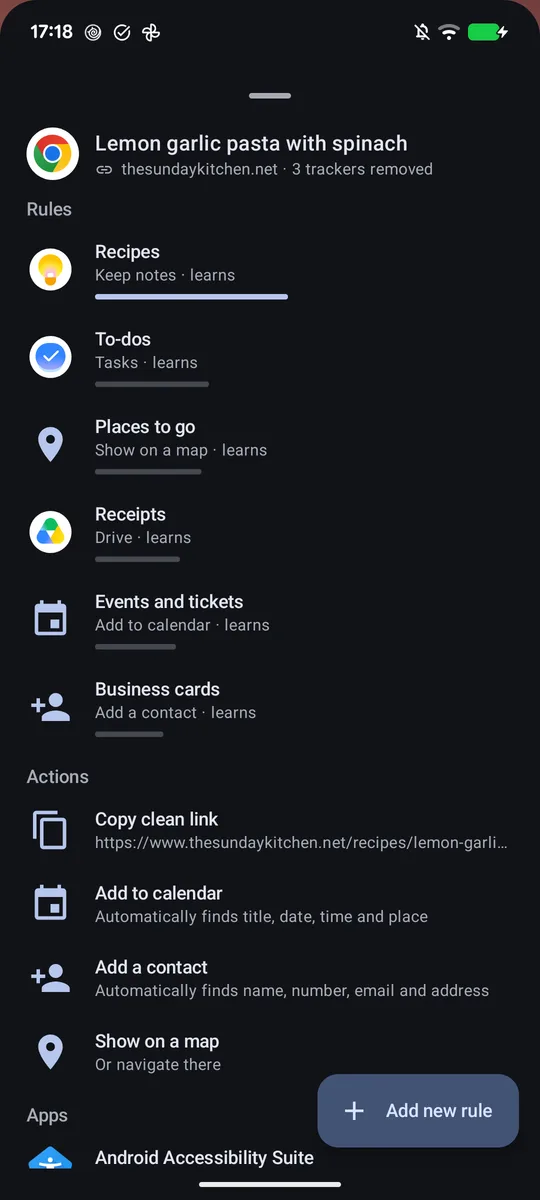
ShareDispatch is a share target for Android with rules you write in plain words. Share a link, a text, a PDF or a picture, and an AI model running on your phone matches it to your rules by meaning, then sends it where it belongs: a folder, your calendar, your contacts, a task list or any app. Automatically, if you like.
Rules in your own words
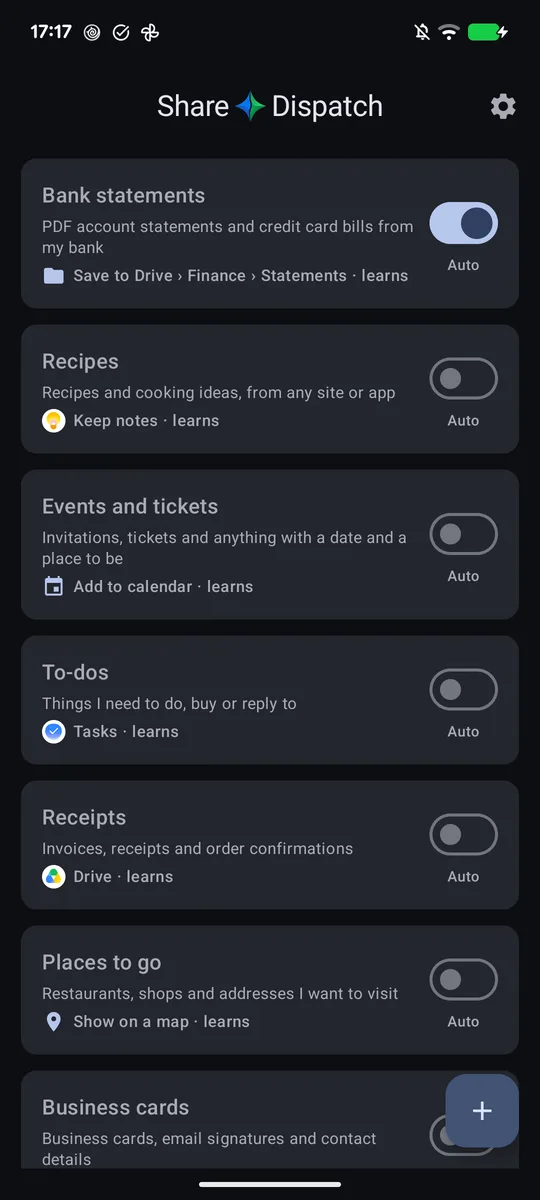
Describe what a rule is for, the way you would say it — “PDF statements from my bank”, “recipes from any site”, “invitations and tickets”. No keywords, filters or site lists: every share is compared with your rules by meaning.
Rules that learn
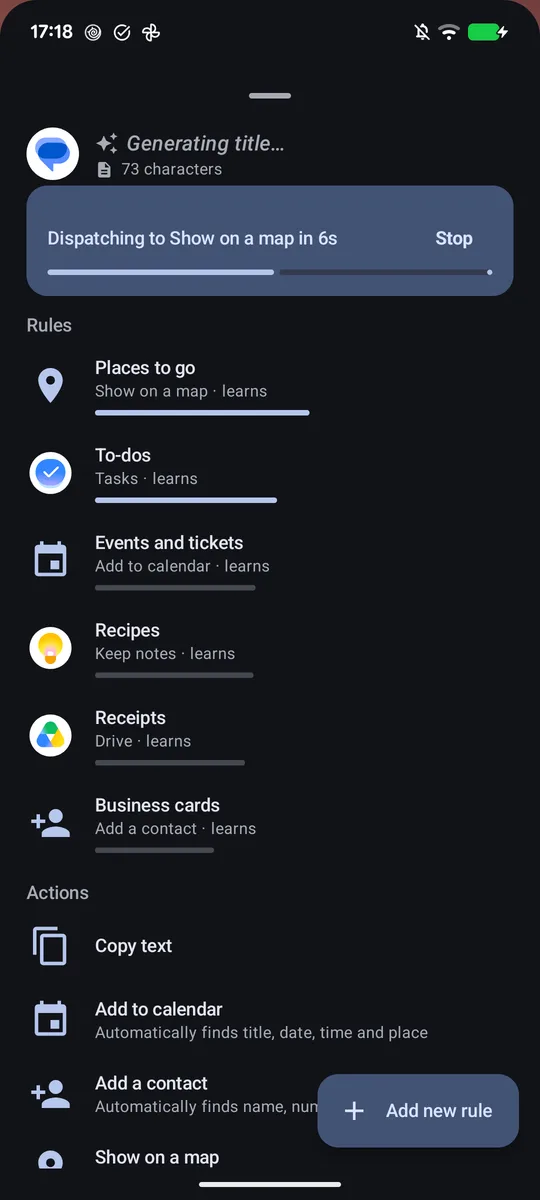
Matching rules come first, each with a bar that shows how well it fits. Rules learn from the shares you pick for them, and you can see and delete everything they learned.
The AI fills in the blanks
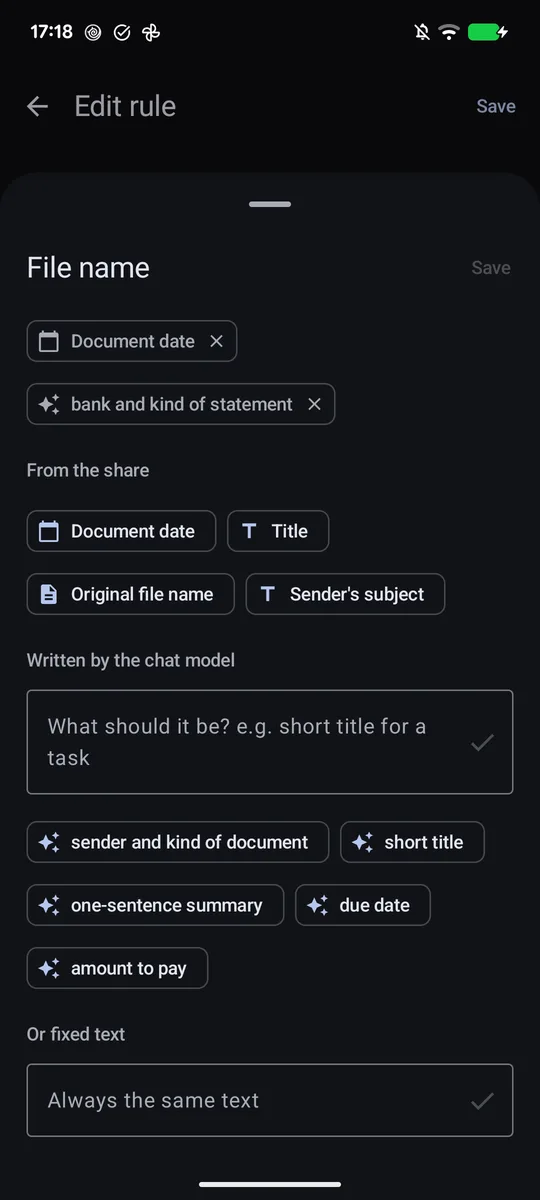
Every share gets a readable title. Ask for any field in plain words — a file name made of {sender and kind of document}, a {short title for a task}, the {amount to pay} — and let it read events, contacts and addresses from the text.
Hands-free when you want it
Let a rule dispatch by itself, after a short countdown you can stop.
Works with your apps
Save files into a folder on your phone or in Google Drive, add events and contacts, make a task, a note, an email or a message, or send to any app that takes a share. As your default browser, ShareDispatch sorts the links you tap in any app the same way.
Private by design
The AI models run on your phone. Links are cleaned of trackers before they go anywhere. No ads, no analytics, no tracking.
Rule matching runs on EmbeddingGemma. For titles and fields, you pick a chat model — Gemma 3 1B, Qwen2.5 1.5B, or Gemma 4 E2B, which also reads pictures. Each model is downloaded once, inside the app. ShareDispatch speaks English and German.
Get it on Google Play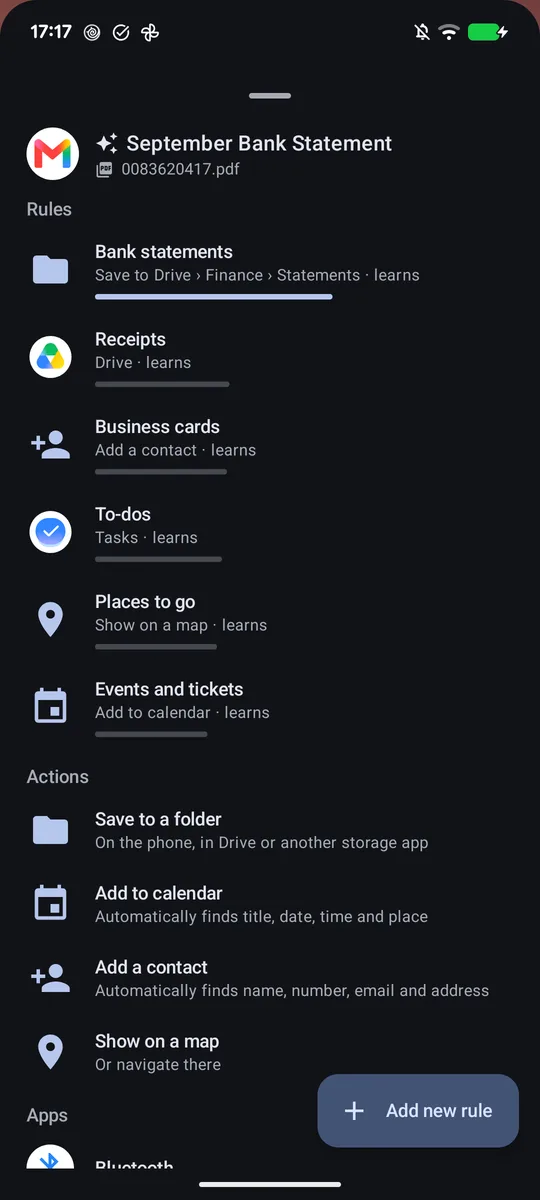
2. Privacy
Effective Date: November 8, 2026 · Deutsch
ShareDispatch, by code//jo, sends what you share to the place your rules say. It does this on your phone. This section says what the app handles, where it goes and what it keeps.
2.1 What We Collect
Nothing. ShareDispatch has no account, no ads, no analytics and no crash reporting, and we run no server that receives anything from it. What you share is read on your phone by AI models that run on your phone.
2.2 What Leaves Your Phone
Only these, and only to the parties named:
- A shared page's title. For a link shared without a title, the app requests that page once (following its redirects), or for YouTube and Spotify links their oEmbed service, to read its title and description. That site sees the request as it would from a browser, including your phone's language. Settings → Read the shared page's title and description turns this off. Links you tap while ShareDispatch is your default browser are matched without this request, unless the sheet stays open.
- Model downloads. When you open Settings, the app asks Hugging Face (
huggingface.co) which of the models it offers are still there, so it offers only those. The request names those models and nothing of yours. When you download a model, Android's download manager fetches it from Hugging Face. For a model that needs a Hugging Face account, the access token you paste is sent only tohuggingface.co, and is kept encrypted on your phone with a key in Android's keystore until you tap Forget token. - What you dispatch. When you tap a rule, an action or an app, or a rule dispatches by itself, the share goes to the app you chose (an email app, a messenger, Drive, a browser, …). From then on that app's privacy policy applies.
- An export file, if you make one. Settings → Export rules saves your rules, settings and learned shares (their titles and vectors) into one file where you choose: on the phone, or in a storage app such as Drive, which then keeps it by its own policy. Import rules reads such a file back. The app sends it nowhere itself.
- Your backup, if you turn it on. Settings → Back up rules and settings (off until you switch it on) lets Android's backup keep your rules, settings and learned shares in your Google account, so a new phone gets them back, and lets them move to a new phone set up from the old one. The app hands them over only if Android encrypts the backup end to end with your screen lock, so neither Google nor we can read it. Switched off, the next backup holds none of it.
2.3 What Stays on Your Phone
- Your rules and settings.
- Shares you pick a learning rule for, kept as that rule's examples: a vector the model computed and a label to show and delete it (title, kind, file name or website, sending app, date). Delete them one by one on the rule's Learning page, or with Forget all.
- Copies of shared files, in the app's cache while it works with them, deleted after a day.
- The downloaded models.
Unless you turn on the backup or save an export file somewhere else, none of this is copied off the phone. The models and the Hugging Face token never are. Uninstalling the app deletes all of it from the phone.
2.4 Permissions
- Internet: for the title and the model downloads above.
- Calendar and contacts: asked for only when you set a rule to add events or contacts directly, and used only to add them and to list the calendars and accounts to choose from. Without them, Calendar or Contacts opens filled in instead. A contact you pick in a rule comes from Android's picker, which hands over only that number or address.
2.5 Children
ShareDispatch isn't directed at children.
2.6 Changes and Contact
If this section changes, the new version is published here with a new date. Questions: sharedispatch@codejo.com. Where we do process personal data (for example, if you email us), our general Privacy Policy applies, including your rights under the GDPR.
Datenschutzerklärung für ShareDispatch (Deutsch)
Gültig ab: 8. November 2026
ShareDispatch von code//jo schickt, was du teilst, dorthin, wo deine Regeln es hinleiten. Das passiert auf deinem Smartphone. Hier steht, womit die App umgeht, wohin es geht und was sie speichert.
Was wir erheben
Nichts. ShareDispatch hat kein Konto, keine Werbung, keine Analyse und keine Absturzberichte, und wir betreiben keinen Server, der etwas von der App bekommt. Was du teilst, wird auf deinem Smartphone von KI-Modellen gelesen, die auf deinem Smartphone laufen.
Was dein Smartphone verlässt
Nur das Folgende, und nur an die genannten Stellen:
- Der Titel einer geteilten Seite. Für einen Link ohne Titel ruft die App diese Seite einmal ab (und folgt ihren Weiterleitungen), bei YouTube- und Spotify-Links deren oEmbed-Dienst, um Titel und Beschreibung zu lesen. Die Website sieht die Anfrage wie die eines Browsers, mit der Sprache deines Smartphones. Einstellungen → Titel und Beschreibung der geteilten Seite lesen schaltet das ab. Links, die du antippst, während ShareDispatch dein Standardbrowser ist, werden ohne diese Anfrage abgeglichen, ausser das Teilen-Fenster bleibt offen.
- Downloads der Modelle. Öffnest du die Einstellungen, fragt die App bei Hugging Face (
huggingface.co) nach, welche der Modelle, die sie anbietet, es dort noch gibt, und bietet nur diese an. Die Anfrage nennt diese Modelle, nichts von dir. Lädst du ein Modell herunter, holt es der Downloadmanager von Android bei Hugging Face. Braucht ein Modell ein Hugging-Face-Konto, geht der Zugriffstoken, den du einfügst, nur anhuggingface.co; auf dem Smartphone bleibt er verschlüsselt, mit einem Schlüssel im Schlüsselspeicher von Android, bis du auf Token vergessen tippst. - Was du weiterleitest. Tippst du auf eine Regel, eine Aktion oder eine App, oder leitet eine Regel selbst weiter, geht das Geteilte an die gewählte App (eine E-Mail-App, einen Messenger, Drive, einen Browser …). Ab dann gilt deren Datenschutzerklärung.
- Eine Exportdatei, wenn du eine anlegst. Einstellungen → Regeln exportieren speichert deine Regeln, Einstellungen und das Gelernte (Titel und Vektoren) in eine Datei, wo du willst: auf dem Smartphone oder in einer Speicher-App wie Drive, die sie dann nach ihren eigenen Regeln aufbewahrt. Regeln importieren liest so eine Datei wieder ein. Die App selbst schickt sie nirgendwohin.
- Deine Sicherung, wenn du sie einschaltest. Mit Einstellungen → Regeln und Einstellungen sichern (aus, bis du es einschaltest) bewahrt die Sicherung von Android deine Regeln, Einstellungen und das Gelernte in deinem Google-Konto auf, sodass ein neues Smartphone sie zurückbekommt, und sie können auf ein neues Smartphone wechseln, das vom alten eingerichtet wird. Die App gibt sie nur heraus, wenn Android die Sicherung Ende-zu-Ende mit deiner Displaysperre verschlüsselt, sodass weder Google noch wir sie lesen können. Ausgeschaltet enthält die nächste Sicherung nichts davon.
Was auf deinem Smartphone bleibt
- Deine Regeln und Einstellungen.
- Geteiltes, für das du eine lernende Regel wählst, als Beispiel dieser Regel: ein Vektor, den das Modell berechnet hat, und eine Beschriftung, um es zu zeigen und zu löschen (Titel, Art, Dateiname oder Website, sendende App, Datum). Einzeln löschen auf der Seite Lernen der Regel, oder alle mit Alles vergessen.
- Kopien geteilter Dateien, im Cache der App, solange sie damit arbeitet, nach einem Tag gelöscht.
- Die heruntergeladenen Modelle.
Ausser du schaltest die Sicherung ein oder speicherst eine Exportdatei anderswo, wird nichts davon vom Smartphone kopiert. Die Modelle und der Hugging-Face-Token nie. Beim Deinstallieren wird alles vom Smartphone gelöscht.
Berechtigungen
- Internet: für den Titel und die Downloads der Modelle oben.
- Kalender und Kontakte: nur erfragt, wenn eine Regel Termine oder Kontakte direkt eintragen soll, und nur dafür genutzt und um die Kalender und Konten zur Auswahl zu zeigen. Ohne sie öffnet sich Kalender oder Kontakte ausgefüllt. Ein Kontakt, den du in einer Regel auswählst, kommt aus der Auswahl von Android, die nur diese Nummer oder Adresse weitergibt.
Kinder
ShareDispatch richtet sich nicht an Kinder.
Änderungen und Kontakt
Ändert sich diese Erklärung, steht die neue Fassung hier, mit neuem Datum. Fragen: sharedispatch@codejo.com.
3. Terms
ShareDispatch is subject to our general Terms & Conditions. In addition:
- AI models: The models ShareDispatch downloads are made by third parties and come under their own licenses. Gemma 3 1B asks you to accept Google's license with a free Hugging Face account before you can download it.
- AI output: Titles, file names, dates and other fields written by the chat model, and the rule a share is matched to, can be wrong. Check them before you rely on them, especially for rules that dispatch automatically.
Contact Us
If you have any questions about ShareDispatch, please contact us:
Summary
ShareDispatch sorts what you share with rules in your own words, using AI models that run on your phone. We have no servers and collect nothing. Only a shared page's title, the model downloads and what you choose to dispatch, export or back up leave your phone — and only to the places named above.